


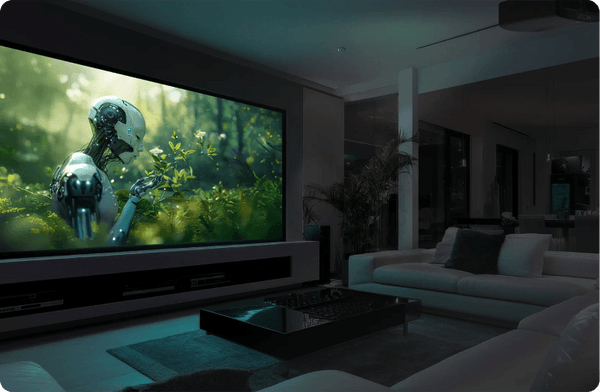
Things to consider when buying an Ultra Short Throw Projector

A 4K ultra short throw projector on a low console can produce a 100- to 150-inch image, depending on the model, without a ceiling mount or a long HDMI run. A separate projector and a rolled or sectional screen can be easier to get through a tight elevator or stairwell. Compare the installed cost of the projector, screen, and any furniture with the cost of a 98- or 115-inch TV that fits your room.
The harder part is comparing models when spec sheets blur important differences in brightness standards, iris contrast claims, and gaming support. Below are the exact questions our projection specialists walk through with shoppers every day. If you want one-on-one help matching a projector and screen to your room, open a chat below or call us at 888-392-4814. For a deeper technical look at throw math and screen gain, pair this checklist with our UST projector buying guide.
Updated November 2026 by Mark Henninger. Because promotional pricing shifts throughout the year, we leave dollar figures out of this guide. See our UST projector collection for current pricing and screen bundle discounts.
Some Things To Look For In An Ultra Short Throw Projector
- Budget and Top Picks by Use Case
- 2025 UST Projector Showdown Takeaways
- Picture Quality: Color Gamut, HDR, and Iris Contrast
- Room Lighting, Lumen Standards, and ALR Screens
- Screen Size, Throw Ratio, and Room Clearance
- When You Need a UST Screen
- Gaming: Input Lag and 4K/120Hz vs. 1080p/240Hz
- Built-In Soundbars vs. External Surround Sound
- Rainbow Effect (RBE) and Laser Speckle
- HDMI Ports, Streaming OS, Calibration, Warranty, and Styling
What Is Your Budget?
Start with a total-system budget. Factor in a screen, a low-profile console or motorized cabinet, and external audio if you plan to bypass the built-in speakers. In a room with ambient light, budget for an ambient light rejecting (ALR) screen designed for UST projection.
- Entry-level value: The Formovie Cinema Edge (2,100 ISO lumens) brings ALPD laser projection and Google TV into the entry tier. The XGIMI AURA 2 (New) adds Dolby Vision, IMAX Enhanced support, and a motorized lens cover. This 2,300 ISO-lumen Google TV version took third for Best Value at the 2025 Showdown.
- Best value: The Hisense PX3-Pro was the judges’ top Best Value pick at the 2025 Showdown, followed by the compact JMGO O2S Ultra. The Hisense PT1 delivers TriChroma RGB triple-laser color and placed third for Dedicated Theater.
- Bright rooms and big screens: The Hisense L9Q Pro is one of the brightest consumer USTs in this guide by manufacturer rating, at up to 5,500 ANSI lumens. Epson rates its Epson QS100 at 4,500 ISO white lumens and 4,500 IDMS color lumens.
- Living-room TV replacement and gaming: The Epson Lifestudio Grand Plus LS970 (4,000 ISO white lumens) and Epson Lifestudio Grand LS670 (3,600 ISO white lumens) both accept 4K/120 Hz on two HDMI inputs and offer Sound by Bose audio and Google TV. Epson specifies different on-screen pixel counts for the two models, as explained in the gaming section.
- Dark rooms and mixed use: The Hisense PX4-Pro and NexiGo Aurora Pro MKII offer adjustable iris control for dark-room viewing. The Hisense L9Q Pro is rated at up to 5,500 ANSI lumens and up to 6,000:1 contrast. The contrast rating is specified with the iris. Closing the iris trades some light output for a lower black floor.
| Model | Best For | Light Engine | Rated White Light Output | Throw Ratio | Streaming Platform |
|---|---|---|---|---|---|
| Formovie Cinema Edge | Entry-level value | ALPD Laser (DLP) | 2,100 ISO lumens | 0.23:1 | Google TV |
| XGIMI AURA 2 (New) | Entry-level smart living room | Dual Light 2.0 (DLP) | 2,300 ISO lumens | 0.177:1 | Google TV |
| Hisense PT1 | Budget dedicated theater | RGB Triple Laser (DLP) | 2,500 ANSI lumens | 0.20:1 | Google TV |
| Hisense PX3-Pro | 2025 Showdown Best Value and Xbox gaming | RGB Triple Laser (DLP) | 3,000 ANSI lumens | 0.22:1 | Google TV |
| JMGO O2S Ultra | Compact footprint and bright value | RGB Triple Laser (DLP) | 3,600 ISO lumens | 0.16:1 | Google TV |
| Epson Lifestudio Grand LS670 | RBE-free living room TV replacement | 3LCD Laser | 3,600 ISO lumens | 0.25:1 nominal | Google TV |
| Epson Lifestudio Grand Plus LS970 | 4K/120 Hz input and bright rooms | 3LCD Laser | 4,000 ISO lumens | 0.16:1 nominal | Google TV |
| NexiGo Aurora Pro MKII | Dark-room contrast, low speckle | ALPD 5.0 Hybrid (DLP) | 2,400 ANSI lumens | 0.21:1 | Android-based interface |
| Hisense PX4-Pro | Theater presets and iris control | RGB Triple Laser (DLP) | 3,500 ANSI lumens | 0.20:1 | VIDAA OS |
| Epson QS100 | Custom integration and bright spaces | 3LCD Laser | 4,500 ISO lumens | 0.16:1 nominal | External source |
| Hisense L9Q Pro | Flagship bright and dark rooms | RGB Triple Laser (DLP) | 5,500 ANSI lumens | 0.18:1 | Google TV |
What Did the 2025 Showdown Judges Think?
At the 2025 UST Projector Showdown, the fourth annual event, we white-balanced the projectors to D65 and the judges compared them side by side on 100-inch screens with the room lights on and off. The original Hisense L9Q won Mixed Room Use, Overall Picture Quality, and Dedicated Theater. The newer Hisense L9Q Pro raises rated output to 5,500 ANSI lumens and adds a physical iris and ±5% vertical optical lens shift. See our Hisense L9Q Pro First Look.
The judges weighed factors including black level, shadow detail, color, and tone mapping alongside brightness. The Hisense PX3-Pro took first for Best Value, and the Hisense PT1 placed third for Dedicated Theater.
Do You Want The Best Picture Quality?
Direct RGB triple-laser engines can reproduce a wide gamut and approach full Rec. 2020 coverage. A gamut coverage percentage describes how much of the reference gamut the projector reproduces and tops out at 100%. A gamut area or color-volume ratio can exceed 100%, depending on the method. Hisense describes the L9Q Pro’s 118% BT.2020 figure as a color-volume ratio in its U.S. spec sheet.
RGB triple-laser options include the Hisense L9Q Pro, Hisense PX4-Pro, Hisense PX3-Pro, Hisense PT1, and JMGO O2S Ultra. The NexiGo Aurora Pro MKII uses an ALPD 5.0 hybrid light engine. NexiGo rates it at 4,000:1 native full-on/full-off contrast and pairs a dynamic iris with laser dimming. See NexiGo’s specs.
Dolby Vision and HDR10+ can supply dynamic metadata for tone mapping. The results depend on the content, projector processing, picture mode, and available light on screen. Closing a static iris lowers peak white and the black floor. A dynamic iris adjusts during playback, while laser dimming varies the light source itself.
With the iris engaged, Hisense rates contrast at up to 6,000:1 on the Hisense L9Q Pro and up to 6,500:1 on the Hisense PX4-Pro. In our L9Q Pro preview, sequential contrast in SDR Filmmaker rose from about 2,780:1 with the iris open to 11,078:1 at position 6, with about 59% of the open-iris white output. In our PX4-Pro review, sequential contrast in HDR Theater rose from 3,021:1 open to 4,144:1 at Manual 3, with 83% of the open-iris white output. See our L9Q Pro measurements and PX4-Pro measurements.
For custom installations, the Epson QS100 offers extensive calibration controls. If daytime viewing is the priority, the Epson Lifestudio Grand LS670 is a mid-tier option rated at 3,600 ISO white lumens and 3,600 IDMS color lumens.
How Much Light Is In The Room?

The larger the image and the more light that reaches the screen, the more projector output you need. ISO/IEC 21118:2020 specifies a nine-point white-light measurement, a production-average rating, and a shipment minimum of 80% of the published figure. The traditional ANSI method also measures white light at nine points. Compare manufacturer ratings by method and use measurements from comparable picture modes when you can.
Epson rates white output under ISO and color output under IDMS. The two ratings are both 3,600 lumens on the LS670, 4,000 on the LS970, and 4,500 on the QS100. Use our UST projector buying guide and calculators to estimate on-screen brightness in foot-lamberts or nits for your screen size and gain. Actual luminance depends on picture mode and where you sit.
For Living Rooms
In a room with windows or overhead lighting, pair a high-output projector with a UST-compatible ALR screen and control direct sunlight where possible. High-rated options in this guide include the Hisense L9Q Pro (5,500 ANSI lumens), Epson QS100 (4,500 ISO white lumens), Epson Lifestudio Grand Plus LS970 (4,000 ISO white lumens), Epson Lifestudio Grand LS670 (3,600 ISO white lumens), and JMGO O2S Ultra (3,600 ISO lumens). Output in your preferred picture mode can differ from the published rating.
The XGIMI AURA 3 Max is rated at 5,700 ISO lumens. At its October launch, XGIMI projected December 2026 shipments.
For Home Theater Rooms
In a light-controlled media room or dedicated theater, native black floor and shadow gradation matter far more than maximum daytime brightness. Strong dark-room choices include the Hisense PT1, Hisense PX3-Pro, Hisense PX4-Pro, and NexiGo Aurora Pro MKII, along with the Hisense L9Q Pro with its iris stepped down.
For Classrooms, Business, And Non-Residential Spaces
Conference rooms, classrooms, and signage installations prioritize sustained output, fleet management, and commercial warranty coverage. The Epson PowerLite 815E and Epson PowerLite 810E use 1080p 3LCD panels with 4K Enhancement. Epson rates each at 5,000 ISO white lumens and 5,000 IDMS color lumens. The Optoma ZU600UST is a 6,000 ISO-lumen laser projector with native 16:10 WUXGA resolution (1920 × 1200).
Ambient Light Rejecting UST Screens
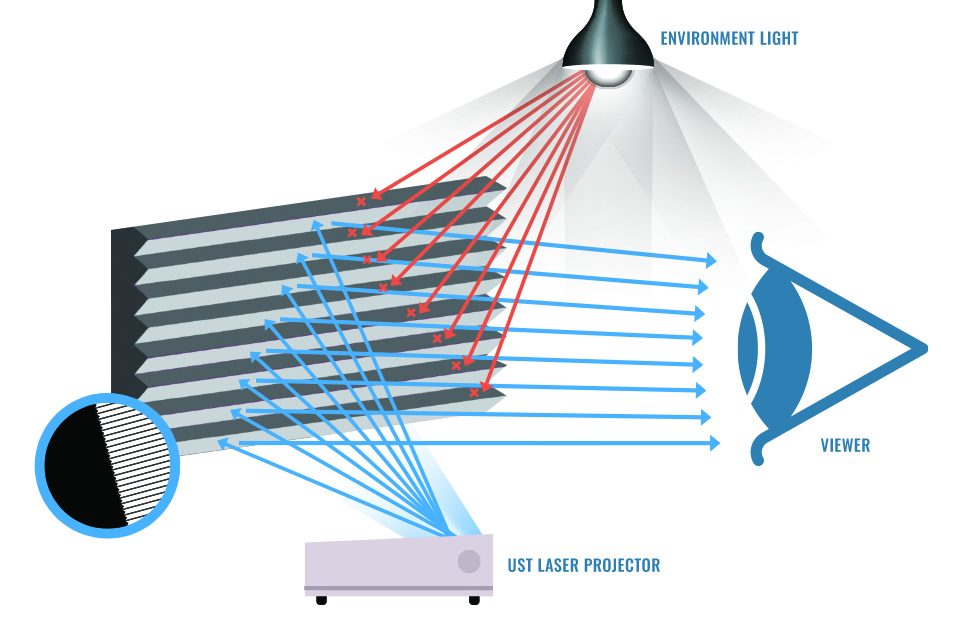
A UST ambient light rejecting screen for a projector below the image directs the projector’s light toward the seating area. Lenticular materials typically favor rejection of overhead light. Fresnel designs can also reject more light from the sides, with a narrower viewing cone on some screens. Check where your windows and lights are and where people sit. Learn more about how UST screens compare with standard screens.
How Big Of A Screen Do You Want?
Many consumer UST projectors work well at 90 to 120 inches, and several are rated for 150 inches. Hisense specifies an 80- to 200-inch image for both the Hisense L9Q Pro and Hisense PX4-Pro. At equal light output and effective screen gain, a 200-inch image has about 36% of the luminance of a 120-inch image. Check screen brightness as well as room clearance before planning around that maximum size.
Ceiling Height and Throw Geometry
Measure floor-to-ceiling height and console depth before you order. Throw ratio is the optical throw distance divided by image width. Use the model’s installation chart for the distance from the back of the chassis to the wall and the height from the stand to the screen. Epson lists a nominal 0.25:1 optical throw ratio for the LS670. Its size-specific chart gives 27.6 inches of optical throw for a 120-inch image, which works out to about 0.26:1 at that size.
For a 120-inch image, the Hisense L9Q Pro installation chart specifies 8.5 inches from the back of the chassis to the wall and 16.1 inches from the stand surface to the lower edge of the reference screen. Those figures assume a 1.2-inch screen depth and an estimated 0.8-inch lower border. The chassis is 12.5 inches deep, so its front sits about 21 inches out from the wall in that setup. The projector also has ±5% vertical optical lens shift for fine alignment.
At the charted offset, a 24- to 30-inch stand puts the top of the image roughly 99 to 105 inches above the floor before frame and mounting clearance. Start with a stand about 21 inches high or lower in an eight-foot room, then check the actual screen and lens-shift range. Low-profile UST cabinets can help. A floor-rising UST screen still needs to land at the projector’s required offset.
Wall Space
Measure unobstructed wall width as well as height, accounting for screen bezel thickness, left and right speakers, light switches, and adjacent doorways or shelving.
Viewing Distance
For a 16:9 image, sit about 12 to 13.5 feet from a 120-inch screen or 10 to 11.2 feet from a 100-inch screen for a roughly 36°–40° horizontal viewing angle. THX cinema guidance recommends 36° from the farthest seat. Its living-room rule of thumb works out to about 40° for a 16:9 screen. Adjust for your seating layout and preference.
Do You Already Have A Projector Screen?

An existing flat, tensioned matte-white screen can work well in a light-controlled room. A conventional long-throw ALR surface can reject some of the steeply angled light from a UST projector. If you use a retractable screen, check its tension and flatness, since the steep projection angle makes ripples more visible. If RGB laser speckle is a concern, judge the specific material from your normal seat.
Check the size and material included in a bundle. For example, the PX3-Pro with a 127-inch Spectra Vantage and the LS970B with a 120-inch Spectra Vantage include different sizes of the fixed-frame UST ALR screen.
Do You Or Your Family Members Play Video Games?
Check which HDMI inputs accept your signal, what the projector displays on screen, and how much input lag it adds at that resolution and refresh rate. Two projectors can accept the same signal and display different amounts of detail.
The Epson Lifestudio Grand Plus LS970 and Epson Lifestudio Grand LS670 accept 4K/120 Hz on HDMI 1 and 2. HDMI 3 on each is limited to 4K/60 Hz. The LS970 uses pixel shifting to produce up to 8.29 million on-screen pixel positions, compared with about 4.15 million on the LS670. ProjectorCentral measured 20 ms of lag on the LS970 with a 4K/120 Hz input in its low-lag test. See Epson’s LS970 display specification and the LS670 manual.
The Hisense PX3-Pro is Designed for Xbox certified, supports ALLM and up to 1080p/240 Hz, and down-converts a 4K/120 Hz input. ProjectorCentral measured 7 ms at 1080p/240 Hz in DLP Turbo mode. RTINGS confirmed VRR on the PX4-Pro and found no VRR on the PX3-Pro. Hisense lists 1080p FreeSync Premium from 48 to 240 Hz on the Hisense PX4-Pro. RTINGS reports that the PX4-Pro displays full 4K at 60 Hz and downscales a 4K/120 Hz input. The Hisense L9Q Pro has two HDMI 2.1 ports with ALLM, and Hisense lists a high-refresh mode up to 240 Hz.
NexiGo lists 4.2–8 ms at 1080p/240 Hz in Low Latency mode and 17.6 ms at 4K/60 Hz for the NexiGo Aurora Pro MKII. NexiGo recommends HDMI 2 for gaming among its three HDMI 2.1 ports. RTINGS found that VRR was unavailable at 240 Hz. With its Enhanced Game Mode, the HDMI 2.0 Optoma GT4000UHD is rated by Optoma at 4.3 ms at 1080p/240 Hz and 16.9 ms at 4K/60 Hz.
Full-resolution 4K/120 Hz support depends on the DLP chipset and the projector’s implementation. Texas Instruments lists 4K/120 Hz support for a newer controller paired with a 0.47-inch DMD, and XGIMI advertises 4K/120 Hz playback on its AURA 3 series.
Do You Have An External Sound System Or Will You Use The Built-In Soundbar?
Built-in UST sound systems vary in output and scale. The Hisense L9Q Pro has 10 speakers rated at up to 116 W, tuned by Opéra de Paris and Devialet, with Dolby Atmos and DTS:X support. The Hisense PX4-Pro also features Devialet-tuned speakers. The Epson LS970 and Epson LS670 feature Sound by Bose 2.1 audio, the JMGO O2S Ultra uses Dynaudio speakers, and the Hisense PX3-Pro and XGIMI AURA 2 (New) use Harman Kardon speakers. The Epson QS100 is designed for installations with an external sound system.
Are You Susceptible To The Rainbow Effect?
Single-chip DLP projectors typically display red, green, and blue in sequence. Sensitive viewers can see brief flashes of color around bright highlights or subtitles. The three-chip 3LCD systems in the Epson Lifestudio Grand Plus LS970, Epson Lifestudio Grand LS670, and Epson QS100 display all three colors simultaneously and avoid this sequential-color rainbow effect.
Laser speckle depends on the light source and the screen. Epson uses laser-phosphor light-source optics to suppress speckle. The NexiGo Aurora Pro MKII uses an ALPD 5.0 hybrid light engine designed to reduce visible speckle.
We saw Dynamic Iris and a stronger optional RBE Reduction setting on the Hisense PX4-Pro running firmware Q0917. In that build, the stronger RBE setting was available in Filmmaker and Theater Night. It could run only with Dynamic Iris off. ProjectorCentral also tested Dynamic Iris and saw occasional changes in brightness at scene cuts. The L9Q Pro preview covered static iris positions 0 through 7. Check the firmware on the U.S. retail unit for the controls it offers.
Additional Factors To Help Narrow Your Choice
How Many Devices Do You Connect To Your Display?
Count your consoles, media players, Blu-ray decks, and soundbar or receiver connections before buying. The Hisense L9Q Pro and Hisense PX4-Pro each have four HDMI inputs, two HDMI 2.1 and two HDMI 2.0. HDMI 3 supports eARC on both.
Do You Prefer Built-In Streaming Apps?
Google TV with Netflix is available on the Hisense L9Q Pro, Hisense PX3-Pro, Hisense PT1, Epson LS970, Epson LS670, JMGO O2S Ultra, Formovie Cinema Edge, and XGIMI AURA 2 (New). On the XGIMI, look for model WM18P for Google TV and licensed Netflix. The original AURA 2 (model WM03B) runs Android TV 11.
The Hisense PX4-Pro runs VIDAA with Netflix and Apple AirPlay. The NexiGo Aurora Pro MKII has an Android-based interface without Google Play. The Epson QS100 has projector menus and integration controls. Streaming requires an external device such as an Apple TV 4K.
Do You Plan To Have Your Projector Calibrated?
Start with the most accurate factory preset for the content you watch. In our PX4-Pro review, SDR Theater Day averaged 1.79 ΔE2000 for grayscale. SDR Filmmaker averaged 10.93, with good saturation tracking and appreciable gamma and luminance error. In our L9Q Pro preview, a two-point white-balance adjustment took the SDR Filmmaker grayscale average from 7.82 to 3.08 ΔE2000 on the sample we tested.
Both Hisense models offer white-balance and color controls. For custom installations, the Epson QS100 also offers extensive calibration adjustments.
What Type Of Warranty Coverage Do You Need?
U.S. coverage varies by model and seller. JMGO and NexiGo list one year for the JMGO O2S Ultra and NexiGo Aurora Pro MKII. Optoma lists one year for parts and labor on the Optoma GT4000UHD, plus five years or 12,000 hours of light-source coverage, whichever comes first.
The Hisense consumer models in this guide and the Formovie Cinema Edge list two years. XGIMI lists two years for the XGIMI AURA 2 (New) when purchased from its U.S. site or official Amazon storefront. For an authorized retailer purchase, check the terms with the retailer or XGIMI.
Epson’s LS970 and LS670 have a two-year limited warranty. Epson offers two-business-day shipping for eligible replacement orders processed by 3 p.m. Eastern, subject to regional availability. Epson lists three years for the Epson QS100 and PowerLite 810E and 815E. Check the applicable terms with your authorized seller.
What Style And Footprint Fits Your Room?
A UST projector usually sits on the front console, where size and finish are visible. Epson offers the QS100, LS970, and LS670 in dark and light finishes. The JMGO O2S Ultra weighs about 9.9 pounds (4.5 kg). The XGIMI AURA 2 (New) has a fabric front and a motorized lens cover. The Hisense L9Q Pro is 24.6 inches wide and houses a 10-speaker system.
Ready To Buy An Ultra Short Throw Projector? Still Need Help?
If you want help choosing an ultra short throw projector for your room, give our projection specialists a call at 888-392-4814 or open a chat with us today. We can walk you through projector comparisons, custom motorized cabinets, screen pairings, and bundle discounts.
Want to keep researching on your own? Browse our latest projector reviews and see the full side-by-side rankings from the 2025 UST Projector Showdown.


