



Epson LS9000 vs Sony XW5000ES: Flexible 4K120 and Native 4K Cinema

A scope screen gives widescreen movies the room they deserve. It also gives you a job every time you switch back to a game or a 16:9 show. The $4,499 Epson LS9000 can recall the zoom, focus and lens shift at the push of a button. It also takes a 4K signal at 120 Hz. For a permanent 16:9 screen in a light-controlled theater, the $5,998 Sony VPL-XW5000ES makes its case with native 4K SXRD panels, deep blacks and Sony’s X1 Ultimate picture processing.
ProjectorScreen.com showed both black models in stock on November 14, 2026, with $1,499 between them. The right place to start is with your screen width, lens position and the sources you use most often.

Epson Pro Cinema LS9000
$4,499
Powered lens memories simplify a scope-screen setup, and 4K120 gives a compatible console or PC room to run at a higher refresh rate.
Shop Epson LS9000
Sony VPL-XW5000ES
$5,998
Native 4K SXRD panels and X1 Ultimate processing suit a dedicated movie screen. A separate 1080p120 option serves games that favor refresh rate.
Shop Sony XW5000ESEpson LS9000 vs Sony XW5000ES Specs
| Spec | Epson LS9000 | Sony XW5000ES |
|---|---|---|
| Imaging Panels | Three 0.74-inch 3LCD panels, each 1920 × 1080. Dual-axis pixel shifting addresses 3840 × 2160 on screen. | Three 0.61-inch SXRD panels, each a native 3840 × 2160. |
| Rated Light Output | 2,200 white lumens (ISO) and 2,200 color lumens (IDMS). | 2,000 lumens. |
| Light Source | Laser phosphor. | Laser phosphor. |
| HDMI Inputs | Two HDMI 2.1 inputs at 40 Gbps with HDCP 2.3. ARC/eARC on HDMI 2. | Two 18 Gbps HDMI 2.0b inputs with HDCP 2.3. Route audio through an AVR or processor. |
| Gaming Signals | 4K60, 4K120 and 1080p120. Select Fast processing for lower lag. | 4K60 and 1080p120. Game mode enables Input Lag Reduction. |
| HDR Formats | HDR10, HDR10+ and HLG. | HDR10 and HLG. |
| HDR Controls | A 16-step HDR adjustment lets you balance bright detail and overall picture brightness. HDR10+ support adds dynamic metadata on compatible sources and content. | X1 Ultimate and Dynamic HDR Enhancer can adjust signal levels and laser output for the scene. |
| Wide Color | About 87% P3 in CIE xy and 90% in u′v′ in our review. Standard optics with no selectable wide-gamut filter. | Sony specifies 95% DCI-P3 coverage. In our review, individual colors tracked their targets to roughly 85% to 95% saturation using the standard optics. |
| Optics | Powered 2.1× zoom, focus and shift with ten lens memories. | Manual 1.6× zoom, focus and shift for alignment at installation. |
| Throw Ratio | 1.35–2.84:1. | 1.38–2.21:1. |
| Lens Shift | Up to ±96.3% vertical and ±24% horizontal. | Up to ±71% vertical and ±25% horizontal. |
| Chassis and Weight | 20.5 × 7.6 × 17.6 in. (W × H × D), including feet. 28 lb. | 18.13 × 7.88 × 18.59 in. (W × H × D). About 28 lb. |
| Box and Mounting | Remote, batteries, power cord and setup guide. Epson lists the black CHF4500 ceiling mount separately. | RM-PJ28 remote, batteries, lens cap, power cord and setup guide. Use a compatible ceiling mount purchased separately. |
| U.S. Warranty | Three-year limited warranty with Epson Extra Care Road Service. | Three-year Sony limited warranty. |
Connect a disc player, streamer or console over HDMI and plan your audio around a receiver, processor or soundbar. Epson’s eARC gives you the option to plug a 4K120 source directly into the projector and send audio back to compatible equipment. With the Sony, put the source through the receiver or processor first to handle audio upstream.
What Each Projector Looks Like in a Theater
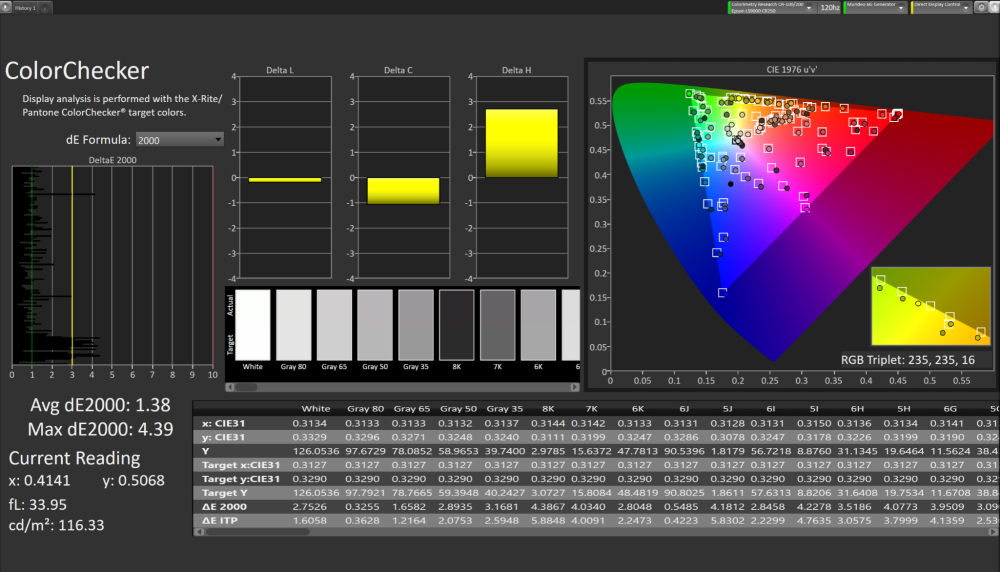
In his Epson LS9000 review, Alan Young measured about 1,750 lumens in the Natural and Cinema modes. On his 92-inch, 1.3-gain reference-white screen, Natural at D65 and full laser produced just over 200 nits from a 12-foot throw. He used a CR-250 spectroradiometer, a CR-100 colorimeter, a Murideo 6G generator and Calman Ultimate. On that screen, the Epson had enough light to give bright HDR scenes some punch. Fine textures held up well with modest image enhancement.
James LaBove’s Sony VPL-XW5000ES review reported 1,813 lumens in uncalibrated SDR Reference and 1,518 lumens in calibrated SDR IMAX Enhanced at laser level 50. His darkened theater used a white, 0.8-gain Seymour AT screen. He found the image sharp and clear.
Young measured just over 2,000:1 native full-on/full-off contrast at the wide end of the Epson’s zoom. LaBove measured 18,113:1 native sequential contrast with a diffused SpectraCal C6 HDR2000 facing the Sony’s lens from one meter, using VideoForge Pro and CalMAN. Both figures describe how the respective test unit handled a full white and full black image. Mixed scenes bring in more variables, and the reviews used different setups and optical conditions.
HDR is where I’d spend time with familiar discs after setting up either projector. On the Epson, the HDR control lets you decide how much brightness to trade for detail in a sunlit window or a bright reflection. On the Sony, try the Dynamic HDR Enhancer at its lower settings first. LaBove found that it could add depth, with the strength of the effect depending on the scene.
Calibration Captures From the Reviews

Lens Placement and Screen Fit
On a 100-inch 16:9 screen, the image is about 87 inches wide. Start with the distance from the front of the lens to the screen. Leave room behind the projector for the chassis, ventilation and cable bends, and check the combined horizontal and vertical shift limits for your proposed mount. The screen calculators can help you start with your actual screen size.
Gaming and Input Lag
The LS9000 can take 4K120 from a compatible console or PC. Check the HDMI cable, receiver and input setting along the whole route. On the Sony, 4K60 keeps the full resolution for films and games that favor detail. Choose 1080p120 for games where you want the higher refresh rate.
| Projector | Published Input Lag |
|---|---|
| Epson LS9000 | Under 20 ms for gaming |
| Sony XW5000ES | Under 21 ms at 4K60 and under 13 ms at 1080p120 |
Editor Ratings and Owner Reviews
| Category | Epson LS9000 | Sony XW5000ES |
|---|---|---|
| Performance | 4.0/5 | 4.0/5 |
| Features | 4.0/5 | 3.5/5 |
| Ease of Use | 5.0/5 | 3.5/5 |
| Review | Alan Young, January 19, 2026 | James LaBove, January 13, 2025 |
Epson LS9000 Owner Review
“The settings are highly customizable”
Patrick, Verified Buyer, September 2, 2025
Patrick singled out the brightness in different lighting and the picture adjustments.
Sony XW5000ES Owner Reviews
“entire family is enjoying movie nights”
Rafael G., Sony.com, May 25, 2023
“Set up was a breeze.”
Toddj1234, Sony.com, May 6, 2023
Epson LS9000 vs Sony XW5000ES FAQ
What does the Sony XW5000ES offer for a dedicated theater?
You get a native 3840 × 2160 image, X1 Ultimate processing and a manual 1.6× lens. Set zoom, focus and shift when you install it, then choose your HDR settings for the screen.
What makes the Epson LS9000 a flexible choice?
Its powered 2.1× lens and ten memories let you move between image sizes from the remote. A 4K120 input adds flexibility if gaming is part of the room’s job.
How do the two projectors create a 4K image?
Sony uses three native 3840 × 2160 panels. Epson uses three 1920 × 1080 panels and shifts pixels on two axes to address 8.29 million positions on screen.
What gaming formats does the Sony support?
Choose 4K60 for full-resolution gaming or 1080p120 for higher refresh. Game mode engages Input Lag Reduction.
How do I check whether each projector fits my mount?
Measure from the front of the lens to the screen and use the actual projected image width. Divide that distance by image width, then check it against the listed throw range and the limits for combined lens shift.
How do their HDR controls work?
Epson offers a manual HDR adjustment and can read HDR10+ dynamic metadata. Sony’s Dynamic HDR Enhancer uses picture processing and laser output to adjust the contrast of HDR scenes.
What do the native contrast numbers describe?
They are full-white to full-black sequential measurements. The Epson reading used the wide end of its zoom. The Sony reading used a diffused meter one meter from the lens. Use each result with its test conditions.
What do I need for a complete sound and video setup?
Plan on an HDMI source such as a streamer, disc player or console and external audio. Epson can send audio back from HDMI 2 over eARC. The Sony fits a setup where the receiver or processor handles audio before sending video to the projector.
Which Projector Fits Your Room?
Start with the Epson LS9000 if you already have a rear mount, switch often between scope movies and 16:9, or want to send 4K120 from your console. The Sony XW5000ES makes sense if you can control the room light, use one screen size and want native SXRD detail for movies. Get the screen width and lens distance right first. They determine how much of either projector’s flexibility you can actually use.
Call us at 888-392-4814 or ask our team for help sizing a screen and planning the placement. You can also shop all projectors.


